
Code for SPIE paper - CEIR
作者:XD / 发表: 2020年4月15日 18:44 / 更新: 2020年4月15日 18:51 / 科研学习 / 阅读量:8676
CEIR
This project is for the SPIE paper - Novel Receipt Recognition with Deep Learning Algorithms. In this paper, we propose an end-to-end novel receipt recognition system for capturing effective information from receipts (CEIR).
CEIR code and results have been made available at: CEIR code
CEIR system demo is available at: CEIR Demo
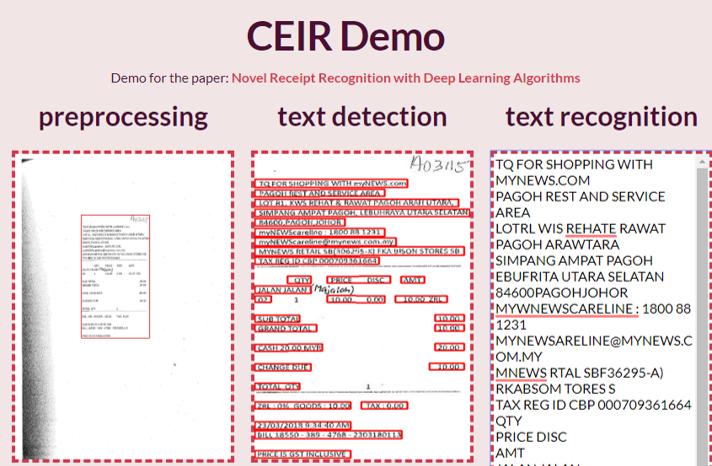
The CEIR has three parts: preprocess, detection, recognition.
Introduction
In the preprocessing method, by converting the image to gray scale and obtaining the gradient with the Sobel operator, the outline of the receipt area is decided by morphological transformations with the elliptic kernel.
In text detection, the modified connectionist text proposal network to execute text detection.
The pytorch implementation of detection is based on CTPN.
In text recognition, the convolutional recurrent neural network with the connectionist temporal classification with maximum entropy regularization as a loss function to update the weights in networks and extract the characters from receipt.
The pytorch implementation of recognition is based on CRNN and ENESCTC.
We validate our system with the scanned receipts optical character recognition and information extraction (SROIE) database.
Dependency
Python 3.6.3 1. torch==1.4 2. torchvision 3. opencv-python 4. lmdb
Prediction
-
Download pre-trained model from Google Drive and put the file under
./detection/output/folder. -
Change the image name to
demo.jpgin the CEIR folder. - Run
python ceir_crop.pyfor stage 1. - Run
python ceir_detect.pyfor stage 2. -
Run
python ceir_recognize.pyfor stage 3. -
The result will be saved in
./result/.
Training
-
Put dataset in
./dataset/train/imageand./dataset/train/label. -
Preprocess parameters can be changed in
./preprocess/crop.py. -
In the detection part, the
./detection/config.pyis used for configuring. After that, runpython train.pyin the detection folder. -
In recognition, you need to change trainroot and other parameters in
train.sh, then runsh train.shto train.